

Quick Answer: Mechanical sewing machines use manual dials and levers to control stitches and are powered by gears and cams, while computerized sewing machines use digital controls, LCD screens, and circuit boards to manage hundreds of stitch patterns automatically. Mechanical machines cost $100-$600 and are simpler to repair, while computerized models range from $300-$3,000+ and offer advanced features like automatic needle threading, stitch memory, and embroidery capabilities. Your choice depends on your budget, skill level, project complexity, and whether you value simplicity or versatility.
Key Takeaways
- Mechanical machines rely on physical cams, gears, and manual controls; computerized machines use circuit boards, motors, and digital interfaces to manage stitching
- Mechanical models typically offer 10-30 built-in stitches; computerized versions can provide 50-1,000+ stitch patterns with customization options
- Beginners often find mechanical machines easier to learn because of their straightforward dial-and-lever controls, though computerized models offer helpful automatic features
- Computerized machines cost 2-5 times more upfront and require professional repair for electronic failures; mechanical machines can often be serviced at home
- Mechanical sewing machines can last 30-50+ years with proper maintenance; computerized models typically function well for 10-20 years before electronic components fail
- Advanced sewers can accomplish professional-quality work on either type, though computerized machines save time on repetitive or complex decorative stitching
- Free-motion quilting, garment construction, and basic alterations work equally well on both machine types when properly maintained
What Is the Difference Between Mechanical and Computerized Sewing Machines?
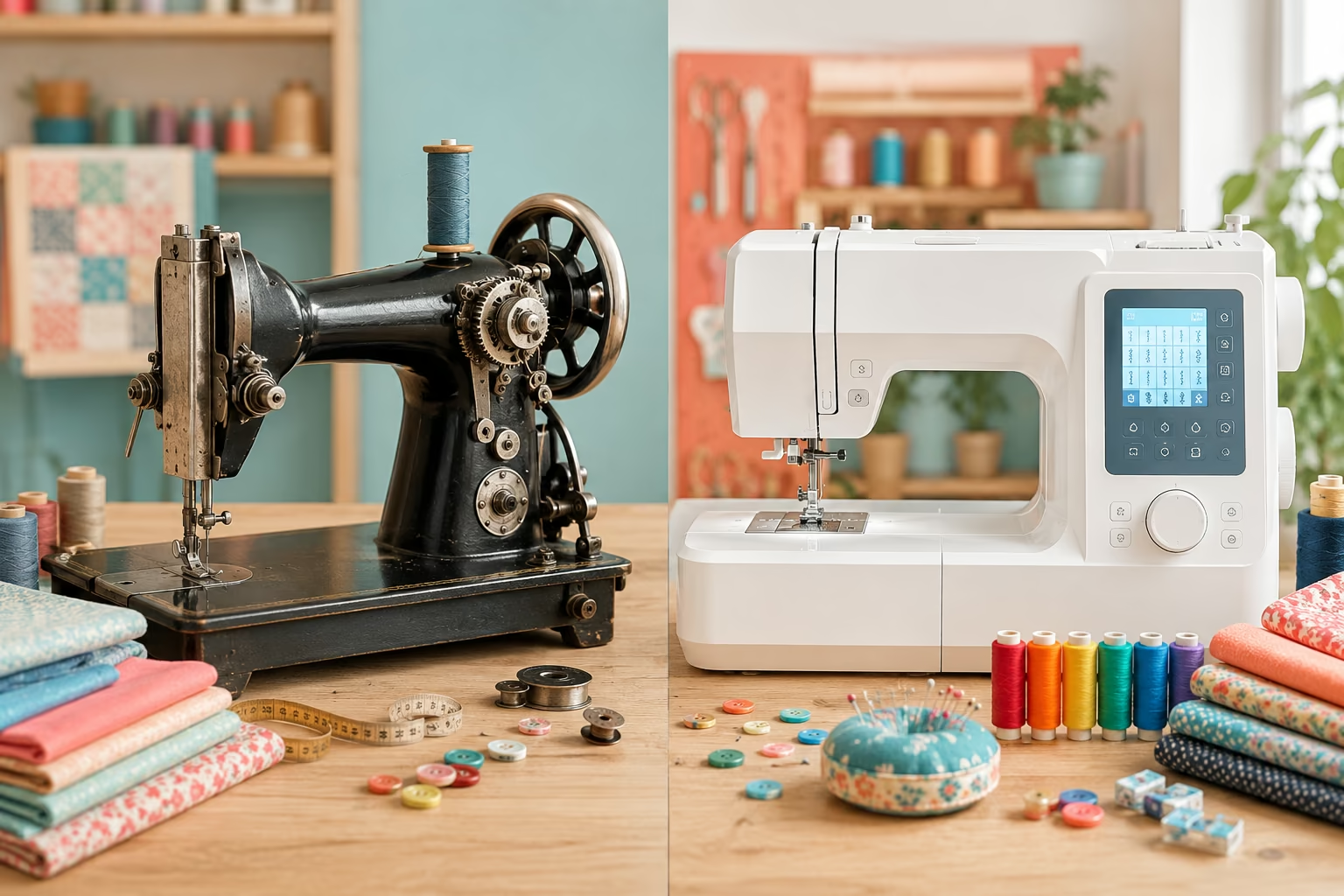
Mechanical sewing machines operate through physical components like metal gears, cams, and levers that you control manually using dials and knobs, while computerized sewing machines use electronic circuit boards, stepper motors, and digital touchscreens or button panels to automate stitch selection and tension adjustments. The fundamental stitching mechanism (needle, bobbin, feed dogs) works the same way in both types, but how you control and customize those stitches differs completely.
Mechanical machine characteristics:
- Stitch selection via a physical dial or lever that rotates cams inside the machine
- Manual tension adjustment using numbered dials you turn by hand
- Stitch width and length controlled by separate mechanical levers
- Typically 10-30 built-in stitches (straight, zigzag, buttonhole, basic decorative)
- No electrical components beyond the motor that powers the needle
- Foot pedal controls speed through direct motor connection
Computerized machine characteristics:
- Stitch selection through LCD touchscreen or button panel with digital display
- Automatic tension adjustment based on fabric type and stitch pattern (with manual override)
- Stitch width, length, and mirror/reverse functions controlled digitally
- 50-1,000+ built-in stitches including complex decorative patterns, alphabets, and sometimes embroidery designs
- Circuit boards manage motor speed, needle position, and stitch formation
- Memory functions to save custom stitch combinations and settings
The core difference affects everything from initial cost to long-term maintenance. Mechanical machines are purely electromechanical devices where you can see and understand how each adjustment physically changes the stitch. Computerized machines function more like small computers that happen to control a sewing needle, with software managing the precision and complexity.
Are Computerized Sewing Machines Better Than Mechanical Ones?
Neither type is objectively better; computerized machines excel at convenience, speed, and stitch variety, while mechanical machines win on durability, repairability, and cost-effectiveness for basic to intermediate sewing. The “better” choice depends entirely on what you sew, how often you sew, and whether you value feature-rich automation or straightforward reliability.
Choose a computerized machine if you:
- Sew decorative projects requiring dozens of different stitch patterns regularly
- Want automatic features like needle threaders, thread cutters, and tension adjustment
- Embroider or plan to add embroidery capabilities later
- Sew professionally or run a small business where time-saving features matter
- Enjoy technology and don’t mind learning digital interfaces
- Have budget flexibility for higher upfront costs and potential repair expenses
Choose a mechanical machine if you:
- Primarily sew garments, quilts, or home décor using basic stitches (straight, zigzag, buttonhole)
- Prefer hands-on control and understanding exactly how your machine works
- Want a machine that lasts decades with minimal maintenance
- Need to keep costs low both initially and for long-term repairs
- Sew in locations without reliable electricity (mechanical machines need less power)
- Value the ability to troubleshoot and fix issues yourself
Common mistake: Assuming more stitches automatically means better results. Most sewers use fewer than 10 stitches regularly, regardless of how many their machine offers. A mechanical machine with 25 well-executed stitches often produces better quality than a budget computerized model with 200 mediocre ones.
How Much Does a Computerized Sewing Machine Cost Compared to Mechanical?
Mechanical sewing machines typically cost $100-$600 for quality home models, while computerized machines range from $300 for basic entry-level models to $3,000+ for advanced machines with embroidery capabilities. The price gap reflects the added cost of circuit boards, LCD screens, and software development, plus the expanded feature sets that computerized models offer.
Mechanical machine price ranges (2026):
- Budget ($100-$200): Basic models with 10-15 stitches, suitable for simple repairs and beginner projects
- Mid-range ($200-$400): 20-30 stitches, metal internal frame, better stitch quality, one-step buttonhole
- Premium ($400-$600): Heavy-duty construction, superior stitch consistency, designed for frequent use
Computerized machine price ranges (2026):
- Entry-level ($300-$600): 50-100 stitches, basic LCD screen, some automatic features
- Mid-range ($600-$1,500): 100-400 stitches, touchscreen interface, automatic needle threader, thread cutter, extensive memory
- Advanced ($1,500-$3,000): 400-1,000+ stitches, embroidery capability, WiFi connectivity, design editing software
- Professional ($3,000+): Commercial-grade construction, large embroidery fields, advanced software integration
Hidden costs to consider:
- Mechanical: Minimal ongoing costs; basic maintenance supplies (oil, needles, bobbins) run $20-$50 annually
- Computerized: Software updates may require fees; proprietary accessories cost more; electronic repairs average $150-$400 per incident versus $50-$150 for mechanical repairs
The total cost of ownership over 10 years often favors mechanical machines for sewers who don’t need advanced features. A $400 mechanical machine with $500 in maintenance over a decade costs $900 total, while a $1,200 computerized machine with $800 in repairs and updates costs $2,000.
Which Sewing Machine Is Better for Beginners: Mechanical or Computerized?
Mechanical sewing machines are generally better for absolute beginners because their straightforward dial-and-lever controls make it easier to understand how stitch length, width, and tension physically affect your sewing, building foundational skills that transfer to any machine. However, computerized machines with automatic features can reduce frustration for beginners who struggle with threading or tension, making both viable depending on learning style and budget.
Why mechanical machines suit most beginners:
- Fewer controls mean less confusion when learning basic stitching
- Physical dials provide tactile feedback that helps you remember settings
- Lower cost reduces anxiety about making mistakes or damaging an expensive machine
- Troubleshooting is more intuitive because you can see mechanical problems
- Forces you to learn proper tension and stitch adjustment, building skills
When computerized makes sense for beginners:
- Automatic needle threader helps sewers with vision difficulties or dexterity challenges
- Pre-programmed stitch settings eliminate guesswork for tension and length
- Built-in tutorials and stitch guides on LCD screens provide on-machine learning
- Automatic thread cutter and tie-off reduce steps in the sewing process
- Beginner who plans to advance quickly to decorative sewing or embroidery
Beginner decision framework:
Start with mechanical if you’re learning to sew garments, quilts, or practical items and want to build fundamental skills on a budget. Choose computerized if you have specific accessibility needs, plan to do decorative sewing from the start, or have budget flexibility and prefer technology-assisted learning.
Common beginner mistake: Buying the cheapest machine available (under $100) regardless of type. Both mechanical and computerized machines at this price point typically have plastic internal components that break quickly and produce poor stitch quality, creating frustration that makes beginners quit. Invest at least $200-$300 in either type for a machine that will support your learning.

Can You Do Free-Motion Quilting on a Mechanical Sewing Machine?
Yes, you can do free-motion quilting on a mechanical sewing machine as long as it has a feed dog drop feature (or you can cover the feed dogs) and accepts a free-motion quilting foot. Free-motion quilting depends on your ability to manually move the fabric rather than on computerized features, making mechanical machines perfectly capable for this technique when properly set up.
Requirements for free-motion quilting on any machine:
- Ability to lower or cover feed dogs so they don’t grip the fabric
- Free-motion or darning foot (usually sold separately for $15-$30)
- Straight stitch capability (the most basic stitch on any machine)
- Adequate throat space (distance between needle and machine body) for maneuvering fabric
Mechanical machine advantages for free-motion work:
- Direct foot pedal control often provides more responsive speed adjustment
- Simpler mechanics mean fewer electronic speed limiters interfering with your rhythm
- Lower machine weight can make it easier to see your quilting lines
- No automatic features to accidentally engage mid-quilting
Computerized machine advantages for free-motion work:
- Needle-up/needle-down programming ensures consistent stopping position
- Adjustable motor speed limiters help beginners maintain control
- Some models offer stitch regulators that maintain consistent stitch length as you move the fabric
- Larger throat space on mid-to-high-end models accommodates bigger quilts
Edge case: If you’re quilting large projects (queen or king-size quilts), throat space matters more than machine type. A mechanical machine with 9+ inches of throat space will outperform a computerized machine with only 6 inches. For serious free-motion quilters, a sit-down longarm quilting machine (which can be mechanical or computerized) is the professional solution, but standard domestic machines of either type work fine for smaller projects.
Do Computerized Sewing Machines Break Down More Often Than Mechanical?
Computerized sewing machines do experience more frequent electronic failures than mechanical machines because they have additional components (circuit boards, LCD screens, sensors) that can malfunction, but well-maintained machines of either type should provide years of reliable service. The difference lies more in repair complexity and cost than in overall breakdown frequency when comparing quality models in similar price ranges.
Common mechanical machine issues:
- Timing problems from worn gears or cams (fixable with adjustment or part replacement)
- Tension assembly wear requiring spring or disc replacement
- Motor brushes wearing out after years of heavy use
- Physical damage to plastic gears in budget models
Common computerized machine issues:
- Circuit board failures from power surges or component aging
- LCD screen malfunctions or touchscreen calibration problems
- Sensor errors causing stitch pattern failures or error messages
- Software glitches requiring resets or updates
- Motor control board issues affecting speed or stitch formation
Reliability factors that matter more than machine type:
- Build quality: A $500 mechanical machine with plastic internals will break more often than a $1,500 computerized machine with metal components
- Usage intensity: Machines used daily for professional work wear faster than hobby machines used weekly
- Maintenance: Regular cleaning, oiling (for mechanical parts), and proper storage prevent 80% of breakdowns in both types
- Power protection: Computerized machines benefit significantly from surge protectors to prevent circuit board damage
Lifespan expectations: Quality mechanical machines routinely last 30-50+ years with maintenance, while computerized machines typically function well for 10-20 years before electronic components become obsolete or fail. However, many sewers upgrade voluntarily before either machine type actually breaks down.
What Are the Disadvantages of Computerized Sewing Machines?
The main disadvantages of computerized sewing machines are higher purchase cost, expensive professional repairs when electronics fail, potential software glitches or obsolescence, and increased complexity that can overwhelm sewers who prefer straightforward mechanical controls. These drawbacks don’t make computerized machines bad choices, but they do represent real trade-offs compared to mechanical alternatives.
Cost-related disadvantages:
- Initial purchase price 2-5 times higher than comparable mechanical machines
- Repair costs $150-$400 per incident versus $50-$150 for mechanical repairs
- Proprietary accessories (feet, bobbins, cases) often cost more
- Potential software update fees or subscription costs for premium features
Reliability and repair disadvantages:
- Circuit board failures require professional repair; DIY fixes usually impossible
- Discontinued models may have no available replacement parts after 10-15 years
- Power surges can destroy electronics instantly (surge protectors essential)
- Software bugs can cause frustrating error messages or stitch failures
Usability disadvantages:
- Steeper learning curve for sewers unfamiliar with digital interfaces
- Touchscreens can be difficult to use with arthritic hands or while wearing quilting gloves
- Automatic features sometimes make incorrect adjustments, requiring manual override
- More complex troubleshooting when something goes wrong
Practical disadvantages:
- Heavier weight (often 20-30 lbs) makes portability harder
- Requires stable electrical power; voltage fluctuations can cause problems
- Noise from cooling fans in some models
- Temptation to rely on machine automation instead of developing manual skills
When these disadvantages matter most: If you sew in a rural area with unreliable electricity, travel frequently with your machine, have a limited budget, or prefer to understand and repair your own equipment, these computerized drawbacks become significant decision factors.
Is a Mechanical Sewing Machine Good Enough for Advanced Sewers?
Yes, mechanical sewing machines are absolutely sufficient for advanced sewers, and many professional tailors, quilters, and garment makers deliberately choose high-quality mechanical models for their reliability, precise manual control, and ability to handle heavy fabrics without electronic interference. Advanced sewing skill depends on the sewist’s technique, not the machine’s feature count.
What advanced sewers actually need:
- Consistent, high-quality straight stitch and zigzag (the foundation of 90% of sewing)
- Reliable buttonhole function
- Adjustable presser foot pressure for different fabric weights
- Strong motor that maintains speed through thick layers
- Durable metal internal components
- Precise tension control
Advanced techniques that work perfectly on mechanical machines:
- Tailoring and garment construction (darts, set-in sleeves, linings, interfacing)
- Quilting (piecing, free-motion, walking foot quilting)
- Home décor (curtains, slipcovers, upholstery)
- Bag making and leather work (with appropriate needles and feet)
- Alterations and repairs
- Heirloom sewing techniques
When computerized features benefit advanced sewers:
- Embroidery and monogramming (requires computerized machine)
- High-volume decorative stitching where saved stitch combinations save time
- Production sewing where automatic thread cutters increase efficiency
- Complex appliqué work using precise stitch positioning features
Professional perspective: Many couture ateliers and professional tailoring shops use vintage mechanical machines from the 1950s-1970s because these machines produce superior straight stitches and handle delicate fabrics beautifully. The Bernina 830 Record (mechanical) and Singer Featherweight (mechanical) remain highly sought-after by advanced sewers decades after production ended.
Bottom line: Advanced sewers should choose based on their specific project types, not on the assumption that “advanced” requires “computerized.” A $600 mechanical machine often produces better results than a $600 computerized machine because more of the budget goes into mechanical quality rather than electronic features.
Why Is My Computerized Sewing Machine Not Reading the Stitch Patterns?
When a computerized sewing machine fails to read or execute stitch patterns, the problem usually stems from software glitches requiring a reset, sensor malfunctions, corrupted memory, or physical issues with the stitch selection mechanism. Start with simple troubleshooting steps before assuming you need professional repair.
Immediate troubleshooting steps:
- Power cycle the machine: Turn off, unplug for 30 seconds, plug back in, and restart (clears temporary software glitches)
- Check the stitch selection method: Ensure you’re pressing buttons firmly or touching the screen properly; recalibrate touchscreen if your model has that option
- Verify you’re not in a locked mode: Some machines have edit lock, memory lock, or demo modes that prevent stitch changes
- Test with basic stitches first: Try selecting straight stitch (usually stitch #1); if that works, the problem may be specific to decorative patterns
- Check for error messages: LCD screen codes often indicate specific problems; consult your manual for code meanings
Common causes and solutions:
- Corrupted memory: Clear saved stitch combinations and custom settings through the machine’s menu system
- Sensor issues: Clean the stitch selection sensors with compressed air; dust buildup can prevent proper reading
- Loose connections: Internal ribbon cables can work loose; requires opening the machine (professional repair recommended)
- Software needs updating: Check manufacturer website for firmware updates for your model
- Physical button damage: If specific buttons don’t respond, they may need replacement
When to seek professional repair:
- Power cycling and basic troubleshooting don’t resolve the issue
- Error messages persist after following manual instructions
- The LCD screen is blank, flickering, or showing garbled information
- Multiple stitch patterns fail simultaneously
- The machine is under warranty (DIY repairs may void coverage)
Prevention tips: Use a surge protector, avoid exposing the machine to extreme temperatures or humidity, and cover the machine when not in use to prevent dust from entering electronic components.
Best Mechanical Sewing Machine Alternatives to Brother Computerized Models
If you’re considering Brother computerized models but prefer mechanical alternatives, look at the Brother XL2600i, Singer Heavy Duty 4452, Janome HD3000, or vintage Kenmore 158 series machines, which offer reliable performance, straightforward controls, and lower costs while maintaining quality construction. These mechanical options provide the durability and ease of use that many sewers prefer without sacrificing stitch quality.
Top mechanical alternatives by use case:
For general sewing (Brother CS6000i alternative):
- Brother XL2600i ($130-$180): 25 stitches, lightweight, good for beginners and intermediate sewers
- Singer 3232 Simple ($150-$200): 32 stitches, automatic needle threader, free arm for sleeves
For heavy-duty sewing (Brother ST371HD alternative):
- Singer Heavy Duty 4452 ($250-$350): Metal frame, 1,100 stitches per minute, handles denim and canvas
- Janome HD3000 ($400-$500): 18 stitches, aluminum body, excellent for garment construction
For quilting (Brother PQ1500SL alternative):
- Janome 1600P-QC ($550-$650): Straight stitch only, 1,600 stitches per minute, 9-inch throat space
- Juki TL-2010Q ($600-$700): Industrial-quality straight stitch, perfect for piecing and free-motion
For budget-conscious sewers:
- Vintage Singer 401A or 500A ($150-$300 used): Slant-needle machines from the 1950s-60s with cam-based decorative stitches, built like tanks
- Kenmore 158 series ($100-$200 used): Reliable workhorses with metal internals, widely available parts
What to look for in mechanical alternatives:
- Metal internal frame and gears (not all-plastic construction)
- At least 15-20 built-in stitches including straight, zigzag, and buttonhole
- Adjustable stitch length and width
- Free arm for circular sewing
- Accessory feet included (zipper, buttonhole, blind hem)
Where mechanical machines fall short: If you specifically need the 100+ decorative stitches, built-in alphabet, or embroidery capability that Brother computerized models offer, no mechanical alternative will match those features. But for core sewing tasks, these mechanical options often outperform entry-level computerized machines in stitch quality and longevity.
Do I Need a Computerized Sewing Machine If I Only Sew Basic Projects?
No, you don’t need a computerized sewing machine if you only sew basic projects like hemming pants, making simple tote bags, crafting pillowcases, or doing basic repairs. A quality mechanical machine with straight stitch, zigzag, and buttonhole capability will handle these tasks perfectly while costing less and requiring simpler maintenance.
Basic projects that need only mechanical features:
- Hemming and alterations (straight stitch, zigzag for stretch fabrics)
- Simple garments (elastic waist skirts, basic tops, pajamas)
- Home décor (curtains, pillow covers, table runners)
- Tote bags and simple pouches
- Quilting (piecing and basic quilting stitches)
- Repairs (patching, replacing zippers, reattaching buttons)
The three essential stitches for basic sewing:
- Straight stitch: 80% of all sewing projects
- Zigzag stitch: Finishing seams, stretch fabrics, appliqué
- Buttonhole: Garments and bags
Everything else is either decorative or specialized. If your projects don’t require decorative stitching, monograms, or embroidery, you’re paying for features you won’t use with a computerized machine.
When basic sewers might still choose computerized:
- You have physical limitations and need automatic needle threading
- You plan to expand into decorative sewing within a year or two
- You find digital interfaces more intuitive than mechanical dials
- You want the convenience of automatic tension adjustment while learning
Cost-benefit reality check: A $300 mechanical machine will serve a basic sewer for 20+ years, while a $900 computerized machine offers hundreds of stitches you’ll never use. Unless you specifically value the convenience features or plan to grow into advanced decorative work, the mechanical option makes more financial sense.
Common mistake: Buying a computerized machine “just in case” you want fancy stitches someday, then using only straight stitch and zigzag for years. If you’re uncertain about future needs, start with mechanical and upgrade later if your sewing interests expand. You can always sell or donate the mechanical machine, and you’ll have saved money in the meantime.
Common Mistakes When Switching From Mechanical to Computerized Sewing Machine
The most common mistakes when switching from mechanical to computerized machines include not reading the manual thoroughly, expecting automatic features to work perfectly without adjustment, forgetting to update tension settings for different fabrics, and becoming frustrated with the digital interface instead of giving yourself time to learn the new system. These errors can make the transition unnecessarily difficult and lead to poor sewing results.
Top switching mistakes and how to avoid them:
1. Skipping the manual
- Mistake: Assuming you can operate a computerized machine the same way as your mechanical one
- Solution: Spend 2-3 hours reading the manual and testing features with scrap fabric before starting real projects
2. Over-relying on automatic settings
- Mistake: Trusting automatic tension and stitch settings without testing on your specific fabric
- Solution: Always sew test samples and adjust settings manually when automatic choices don’t produce good results
3. Not using the needle up/down function
- Mistake: Forgetting to program needle position, causing frustration when pivoting or stopping
- Solution: Set needle-down as your default for most sewing; it prevents fabric shifting
4. Ignoring software updates
- Mistake: Never checking for firmware updates, missing bug fixes and improvements
- Solution: Check manufacturer website every 6 months for updates; install them during non-project time
5. Selecting overly complex stitches unnecessarily
- Mistake: Using decorative stitches where simple ones work better, slowing down your sewing
- Solution: Stick with basic stitches for construction; save decorative stitches for intentional embellishment
6. Not protecting the machine electronically
- Mistake: Plugging directly into wall outlets without surge protection
- Solution: Always use a quality surge protector; power surges destroy circuit boards instantly
7. Expecting the same tactile feedback
- Mistake: Pressing buttons too lightly or not holding long enough because you’re used to mechanical dials
- Solution: Learn your machine’s button sensitivity; some require firm presses or 2-second holds
8. Forgetting to save custom settings
- Mistake: Adjusting settings perfectly, then losing them when you turn off the machine
- Solution: Use memory functions to save favorite stitch combinations and tension settings
Adjustment period expectations: Give yourself 10-20 hours of sewing time to feel comfortable with a computerized machine if you’re switching from mechanical. The learning curve is real, but most sewers adapt within a month of regular use.
Can You Repair a Computerized Sewing Machine Yourself or Does It Need a Technician?
You can perform basic maintenance and simple mechanical repairs on computerized sewing machines yourself (cleaning, oiling, replacing needles and belts, adjusting timing), but electronic issues like circuit board failures, sensor malfunctions, or software problems require a qualified technician with specialized diagnostic equipment. The key is knowing which problems are mechanical versus electronic.
DIY-friendly repairs and maintenance:
- Cleaning lint from bobbin area, feed dogs, and tension discs
- Oiling mechanical parts per manual instructions (not all computerized machines require oil)
- Replacing needles, bobbins, and bobbin cases
- Changing light bulbs (LED or traditional)
- Replacing drive belts (mechanical component)
- Adjusting bobbin tension with small screwdriver
- Resetting the machine through menu options for software glitches
Repairs that need professional service:
- Circuit board replacement or repair
- LCD screen replacement
- Touchscreen calibration issues
- Motor control board problems
- Sensor replacement or recalibration
- Internal wiring repairs
- Timing adjustment on computerized models (more complex than mechanical)
- Software corruption requiring specialized tools
When to attempt DIY versus call a technician:
- Try DIY first if: The machine shows no error messages, the problem is intermittent, or you can see an obvious mechanical issue (loose belt, tangled thread)
- Call a technician if: Error codes appear on the LCD, the machine won’t power on, stitches form incorrectly despite correct threading and tension, or you’ve tried basic troubleshooting without success
Cost considerations:
- DIY maintenance supplies: $20-$50 annually for cleaning tools, oil, and replacement parts
- Professional service call: $75-$150 diagnostic fee plus parts and labor
- Circuit board replacement: $200-$500 depending on model
- Warranty coverage: Always check if your machine is still under warranty before attempting repairs
Resources for DIY repairs:
- YouTube videos specific to your machine model
- Online sewing machine forums (PatternReview, Sewing Forum)
- Service manuals (sometimes available from manufacturer or third-party sellers)
- Local sewing machine repair shops often offer classes on basic maintenance
Important limitation: Unlike vintage mechanical machines where determined sewers can learn to fix almost anything, computerized machines have a ceiling on DIY repairs. Once you reach electronic component failure, professional help is necessary unless you have electronics repair training.

How Long Do Mechanical Sewing Machines Last Compared to Computerized?
Mechanical sewing machines typically last 30-50+ years with proper maintenance, and vintage models from the 1950s-1970s still function perfectly today, while computerized machines generally provide 10-20 years of reliable service before electronic components fail or become obsolete. The lifespan difference reflects the durability of metal gears versus the limited life of circuit boards and the reality of electronic obsolescence.
Factors affecting mechanical machine longevity:
- Build quality: Vintage all-metal machines (Singer Featherweight, Bernina 830) can last 70+ years
- Usage intensity: Home machines used weekly last longer than professional machines used daily
- Maintenance: Regular cleaning and oiling prevent 90% of wear-related failures
- Replacement parts: Widely available for popular brands even decades after production ends
Factors affecting computerized machine longevity:
- Electronic component lifespan: Capacitors, circuit boards, and LCD screens have finite lifespans (typically 10-15 years)
- Software obsolescence: Older models may not receive updates, making them incompatible with modern computers
- Parts availability: Discontinued models often have no replacement circuit boards after 10-15 years
- Power quality: Voltage fluctuations and surges shorten electronic component life
Real-world lifespan expectations by price point:
Mechanical machines:
- Budget ($100-$200): 5-10 years (plastic components wear out)
- Mid-range ($200-$400): 15-25 years with maintenance
- Premium ($400-$600): 30-50+ years; often outlive their owners
Computerized machines:
- Entry-level ($300-$600): 5-10 years (electronics fail first)
- Mid-range ($600-$1,500): 10-15 years typical lifespan
- Premium ($1,500-$3,000): 15-20 years; mechanical parts outlast electronics
The obsolescence factor: Even if a computerized machine’s electronics still function after 20 years, software compatibility issues may make it difficult to use with modern computers for design transfer, and replacement parts become unavailable. Mechanical machines don’t face this problem because they don’t depend on software or electronic components.
Maximizing lifespan for both types:
- Use surge protectors for computerized machines
- Clean after every 8-10 hours of sewing
- Oil mechanical parts per manufacturer schedule
- Store in climate-controlled space (avoid garages and basements)
- Service professionally every 2-3 years for heavy users
- Use quality thread (cheap thread creates more lint and tension problems)
Investment perspective: If you plan to sew for decades, a $500 mechanical machine that lasts 40 years costs $12.50 per year, while a $1,500 computerized machine that lasts 15 years costs $100 per year. Factor in repair costs, and the mechanical option often provides better long-term value unless you specifically need computerized features.
Frequently Asked Questions
Can I use the same presser feet on both mechanical and computerized machines?
Presser feet compatibility depends on the shank type (low shank, high shank, slant shank) rather than whether the machine is mechanical or computerized. Most modern domestic machines of both types use low-shank feet, making them interchangeable. Check your machine’s shank type before purchasing feet.
Do computerized sewing machines use more electricity than mechanical ones?
Computerized machines use slightly more electricity (typically 70-120 watts versus 60-90 watts for mechanical) because they power LCD screens, circuit boards, and additional motors for automatic features. The difference adds less than $5 annually to electricity costs for typical home use.
Can you convert a mechanical sewing machine to computerized?
No, you cannot convert a mechanical machine to computerized. The two types have fundamentally different internal architectures. Mechanical machines use cams and gears to create stitches, while computerized machines use stepper motors and circuit boards. Conversion would require replacing essentially the entire machine.
Which type is quieter during operation?
Mechanical machines are generally quieter because they lack cooling fans and electronic components that create additional noise. However, machine-to-machine variation matters more than type; a well-maintained mechanical machine and a quality computerized machine both operate at reasonable noise levels (60-70 decibels).
Do professional seamstresses prefer mechanical or computerized machines?
Professional preferences vary by specialty. Tailors and garment makers often prefer mechanical machines for reliability and stitch quality, while embroiderers and decorative sewers require computerized machines. Many professionals own both types and choose based on the specific project.
Can mechanical machines sew as fast as computerized ones?
Yes, high-quality mechanical machines can sew 800-1,100 stitches per minute, matching or exceeding many computerized models. Speed depends more on motor quality and machine construction than on whether it’s mechanical or computerized. Some industrial mechanical machines sew faster than any domestic computerized model.
Are replacement parts more expensive for computerized machines?
Yes, electronic components (circuit boards, LCD screens, sensors) cost significantly more than mechanical parts (gears, cams, springs). A replacement circuit board might cost $200-$400, while mechanical parts typically cost $20-$80. Additionally, computerized parts may become unavailable when models are discontinued.
Do computerized machines require special thread or needles?
No, both mechanical and computerized machines use the same standard needles and thread. Thread and needle selection depends on fabric type, not machine type. Use quality thread in both types to prevent lint buildup and tension problems.
Can you use a mechanical sewing machine without electricity?
Vintage mechanical machines with treadle (foot pedal) or hand-crank attachments can operate without electricity. Modern mechanical machines require electricity to power the motor, but they draw less power than computerized models and can work with small portable generators or power inverters.
Which type holds its resale value better?
Quality mechanical machines, especially vintage models from reputable brands, often appreciate in value or hold steady resale prices. Computerized machines depreciate like electronics, losing 50-70% of their value within 5-10 years. Vintage Singer Featherweights and Bernina mechanical models sometimes sell for more than their original purchase price.
Do computerized machines require more frequent servicing?
Both types benefit from annual professional servicing if used heavily, but computerized machines may need additional electronic diagnostics and software updates. Maintenance frequency depends more on usage intensity than machine type. Home sewers using either type weekly can typically go 2-3 years between professional services.
Can beginners learn proper tension control on computerized machines with automatic tension?
Beginners can learn tension control on computerized machines, but they must practice manual tension adjustment rather than relying solely on automatic settings. Many sewing instructors recommend learning on mechanical machines first to develop tension skills, then transitioning to computerized models once fundamentals are solid.
Conclusion
The choice between mechanical and computerized sewing machines ultimately comes down to your specific needs, budget, and sewing goals rather than one type being universally superior. Mechanical machines offer unbeatable durability, lower costs, simpler repairs, and straightforward operation that many sewers prefer for garment construction, quilting, and everyday projects. Computerized machines provide convenience features, extensive stitch libraries, and automation that save time for decorative sewing, embroidery, and high-volume production work.
Take these next steps to make your decision:
List your actual projects: Write down what you’ve sewn in the past year and what you plan to sew in the next two years. If 90% involves basic stitches, mechanical makes sense.
Set a realistic budget: Include not just purchase price but also potential repair costs over 10 years. Mechanical machines cost less upfront and long-term.
Test both types: Visit a sewing machine dealer and actually sew on both mechanical and computerized models. Your hands-on experience matters more than online reviews.
Consider your repair comfort level: If you enjoy understanding how things work and prefer DIY maintenance, mechanical machines offer more autonomy. If you’d rather have a technician handle everything, computerized repair complexity matters less.
Think long-term: A quality mechanical machine can serve you for decades and potentially become a family heirloom. A computerized machine offers cutting-edge features now but will eventually become obsolete.
For most sewers, a mid-range mechanical machine ($300-$500) provides everything needed for a lifetime of satisfying sewing projects. Choose computerized only if you specifically need its advanced features or if convenience functions genuinely improve your sewing experience. Either way, invest in quality construction, maintain your machine properly, and focus on developing your skills, because great sewing comes from the sewist, not the machine. 🧵✨